 Viewing matter requests
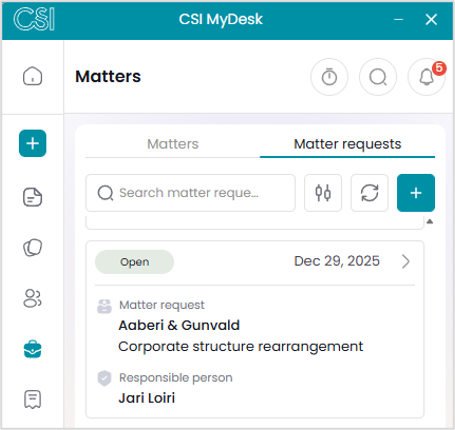
The Matter requests tab displays all matter requests which have the status “Open” and to which you have the necessary access rights. You can search for specific matter requests based on their subject or the principal’s name.
For each matter request, the creation date, client, subject, and responsible lawyer are displayed.
By selecting a matter request from the list, you can view its additional details.
The screen of an individual matter request contains its owner, type, language, and currency.
If a conflict check has been performed for the request, the “Conflict check done” field is displayed with the conflict check date.
The screen allows you to view further details of the matter principal as well as the matter request related parties, identifications, and notes.
 Creating matter requests
You can create a new matter request either via a conflict check or directly from the case request list by clicking the button.
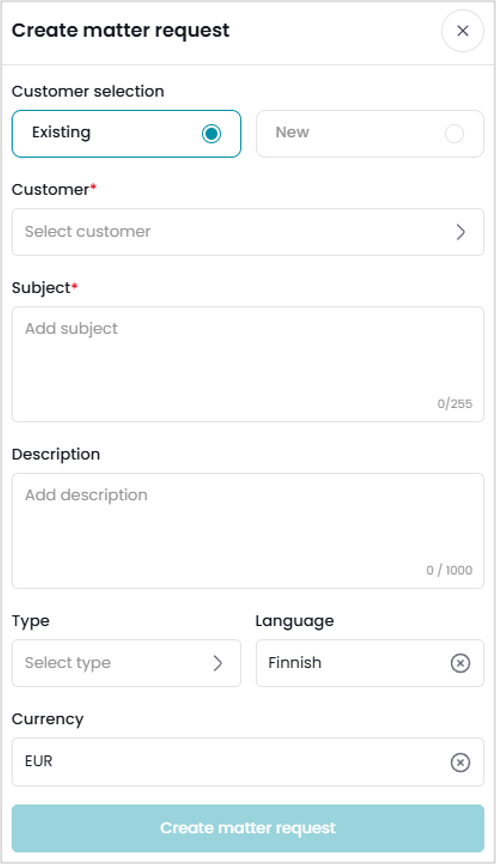
The button opens a view for creating a new matter request. You can either add an existing client as the principal for the matter request or create a completely new corporate customer or private person.
To save a new customer, the type, name, and country must be specified.
Once a customer has been selected or a new one has been created, the customer is added to the matter request. You can then enter a subject and a more detailed description, as well as select the matter type, language, and currency. After entering the details, you can save the matter request by clicking the ‘Create matter request’ button.
After the matter request has been saved and reopened, the tabs Parties, Identifications, and Notes are displayed. You can add notes to the matter request, but adding other parties, performing customer identification, and creating matters must be done in the CSI software.
Comments
0 comments
Please sign in to leave a comment.